How my Chrome extension syncs without lag or lost data
I built WeekTab because I wanted my week’s tasks in front of me every time I open a new tab. It started as a local-only Chrome extension, and for a while that was enough. Then I found myself switching between two machines every day, and a task list that lives on only one of them stops being useful. So I added cloud sync with Supabase.
Sync is where all the interesting problems live. I had four rules. Typing must feel instant. Don’t hit the database on every keystroke. Don’t lose offline edits. And don’t let a fresh install wipe what’s already in the cloud.
Meeting all four at once took more thought than I expected. What I ended up with is four layers sitting between a keystroke and a Supabase write, and each layer exists because of a specific bug it prevents. I figured it was worth writing down.
For context, the stack is React 19 with TypeScript, a Manifest V3 Chrome extension, chrome.storage.local for local persistence, and Supabase (Postgres) for the cloud side.
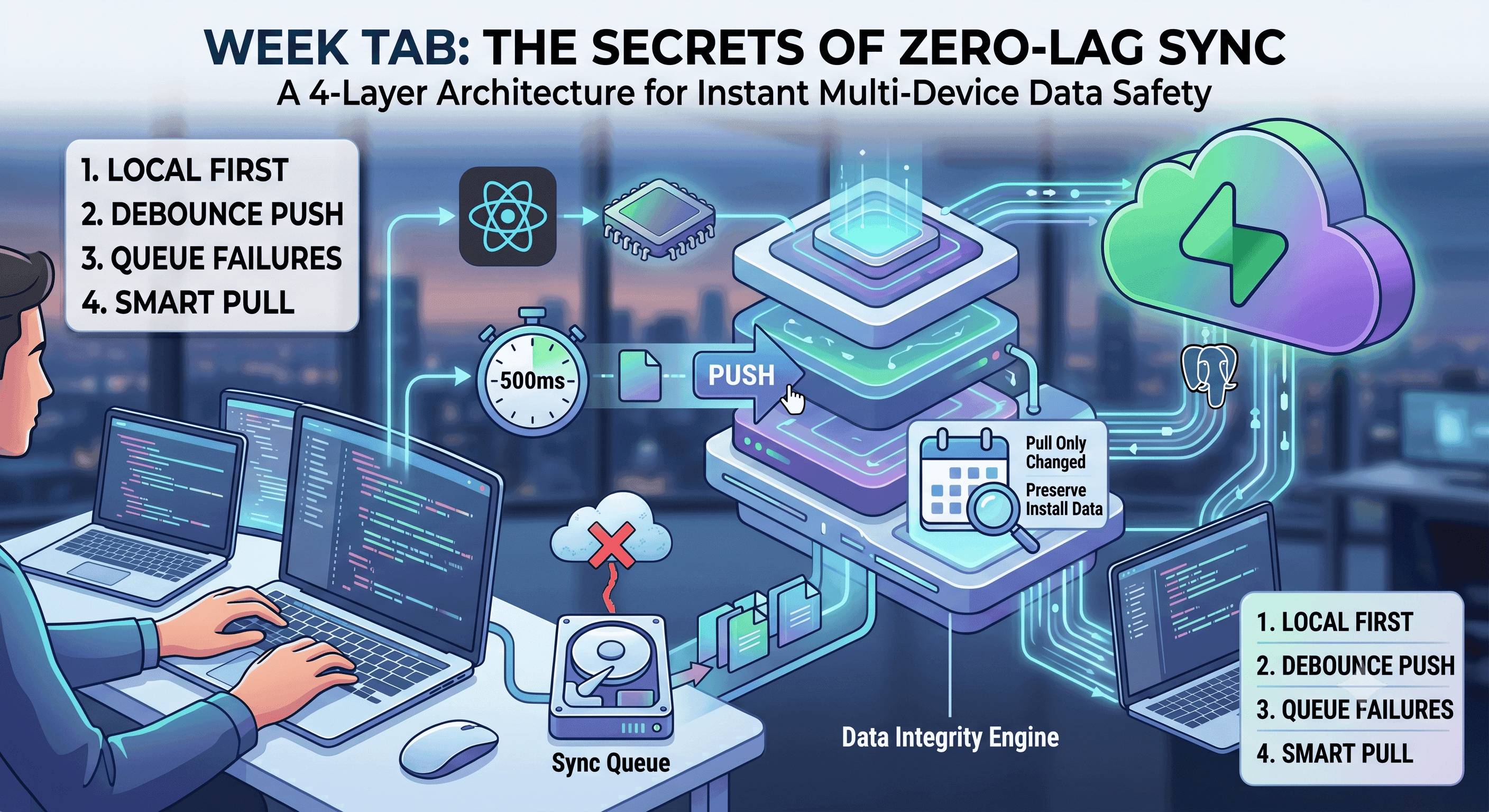
Here’s the whole architecture in one picture. The rest of the post walks through each layer.
Layer 1: typing only saves locally
Every input handler, whether it’s editing a day’s tasks, the someday list (tasks with no date yet), or notes, writes to React state and chrome.storage.local first. The network is simply not in the keystroke path.
The storage hook updates an in-memory week map, updates React state, then awaits the local storage save. No Supabase call anywhere. A synced wrapper around that hook does the local update first, then schedules the push for later.
What this prevents: laggy typing tied to network latency, and total data loss when offline. Local is the source of truth. The cloud is a follower.
Layer 2: wait for a pause before pushing
The push to Supabase waits until you stop typing. Every edit resets a 500 ms timer, and the push only happens when the timer runs out. Twenty keystrokes in two seconds become one push, carrying the final state.
// useSyncedStorage.ts
const DEBOUNCE_MS = 500;
const debounceTimer = useRef<ReturnType<typeof setTimeout> | null>(null);

function schedulePush(tasks: Task[]): void {
  if (debounceTimer.current) clearTimeout(debounceTimer.current);
  debounceTimer.current = setTimeout(async () => {
    try {
      await pushToCloud(userId, tasks);
    } catch {
      await queueForSync(userId, tasks);
    }
  }, DEBOUNCE_MS);
}
Notes work the same way, just with two timers: 300 ms for the local save and 500 ms for the cloud push. React state still updates instantly, so typing stays smooth. Saving locally is just more urgent than syncing.
One detail worth calling out: the push sends the whole task array, not individual changes. Even if five tasks changed while the timer was running, Supabase still sees one request.
What this prevents: a database write for every keystroke.
Layer 3: failed pushes wait in a queue
Sometimes the push fails. Maybe the connection is intermittent, maybe there’s a problem in your network, maybe the server is having a bad day. When that happens, the batch of tasks goes into a queue in chrome.storage.local. The next full sync replays the queue first.
// sync.ts
export async function retryQueue(): Promise<void> {
  const queue = await getSyncQueue();
  const remaining: SyncQueueItem[] = [];
  for (const item of queue) {
    try {
      await pushToCloud(item.userId, item.tasks);
    } catch {
      remaining.push(item);
    }
  }
  await setSyncQueue(remaining);
}
The important choice here is that the queue lives on disk, not in memory. Closing the tab doesn’t lose pending writes. And there’s no retry loop hammering Supabase when it’s struggling. The app just waits for the next natural sync.
What this prevents: losing edits when you close the tab while offline, and retry storms when the server is down.
Layer 4: only pull what changed
Now, to avoid syncing empty results when you switch to a new laptop, the pull side needs as much care as the push side.
Pulling from the cloud uses a timestamp stored locally, called lastSyncAt. Each pull only asks for rows that changed after that timestamp. So reopening a tab doesn’t re-download your whole history. Whatever comes back gets merged with the local tasks, and when both sides edited the same task, the newest edit wins.
The tricky part is deciding when to move that timestamp forward:
// sync.ts
if (merged.length > 0 || lastSyncAt !== null) {
  await setLastSyncAt(now);
}
Here merged is the combined local and cloud task list, so on a fresh install it’s only empty when the cloud also returned nothing. On the very first sync (lastSyncAt === null), if the response comes back empty, the timestamp does not move. An empty response might be a glitch, not the truth. Move the timestamp anyway and every old task you own becomes invisible, forever. You’d sign in on a new laptop, see an empty list, and conclude your data is gone, even though every row is sitting safely in Postgres. This is the kind of bug you only hit in production, on flaky cafe wifi, on a fresh install.
What this prevents: re-downloading everything on every page open, and a glitch on first sync hiding your data for good.
The whole thing at a glance
| Layer | What it does | Bug it prevents |
|---|---|---|
| 1 | Save to React state and local storage first | Laggy typing, lost offline edits |
| 2 | Push only after a 500 ms pause in typing | Twenty keystrokes becoming twenty writes |
| 3 | Failed pushes wait in a queue on disk | Lost edits when the tab closes, retry storms |
| 4 | Pull only what changed; don’t move the timestamp on an empty first sync | Re-downloading everything, hidden data |
What I deliberately didn’t build
No background service worker for sync. Chrome kills them aggressively, and pushing from the open tab itself is simpler and more reliable.
No rolling back the UI when a push fails. Local is the source of truth, so a failed push just waits in the queue. What you see on screen never flickers back.
No realtime subscriptions. It’s one person on a few devices, not a shared document. Syncing on open and after edits is enough.
No conflict screens. The newest edit quietly wins, which is exactly how it should feel at this scale.
Wrapping up
Two lessons from building this.
First, keep the network out of the typing path. Save locally, push later. Most of what makes the app feel fast comes from this one decision.
Second, the most important sync code is the code that decides when not to act. Don’t push on every keystroke. Don’t retry in a loop. Don’t move the sync timestamp on an empty first sync. The boring guard clauses are what keep the data safe. ✌️